
Testomat.io Reporter
👋 Hey, do you need some test reporting?
Testomat.io Reporter is a library that integrates with popular JavaScript and TypeScript test frameworks to provide a common interface for test reporting. By default, Testomat.io Reporter works with our reporting cloud service Testomat.io App, however it is not locked to it. Reporter can be used as a standalone tool.
Features
Section titled “Features”Testomat.io Reporter (this npm package) supports:
- 🏄 Integarion with all popular JavaScript/TypeScript frameworks
- 🗄️ Screenshots, videos, traces uploaded into S3 bucket
- 🔎 Stack traces and error messages
- 🐙 GitHub, GitLab & Bitbucket integration
- 🚅 Realtime reports
- 🗃️ Other test frameworks supported via JUnit XML
- 🚶♀️ Steps (work in progress)
- 📄 Logger (work in progress, supports Jest for now)
- ☁️ Custom properties and metadata (work in progress)
- 💯 Free & open-source.
- 📊 Public and private Run reports on cloud via Testomat.io App 👇
How It Works
Section titled “How It Works”Testomat.io Reporter provides common API to store and organize test reports. It can receive test result data from any test framework and send it to different services via pipes.
| 🌊 Input | 📊 Output |
|---|---|
| Playwright | Report to GitHub |
| Cypress | Report to GitLab |
| Jest | Report to Testomat.io |
| … | … your custom report |
If you use multiple test frameworks and you need to use one customizable reporter, check Testomat.io Reporter, as you can adjust it once and attach it to all your projects.
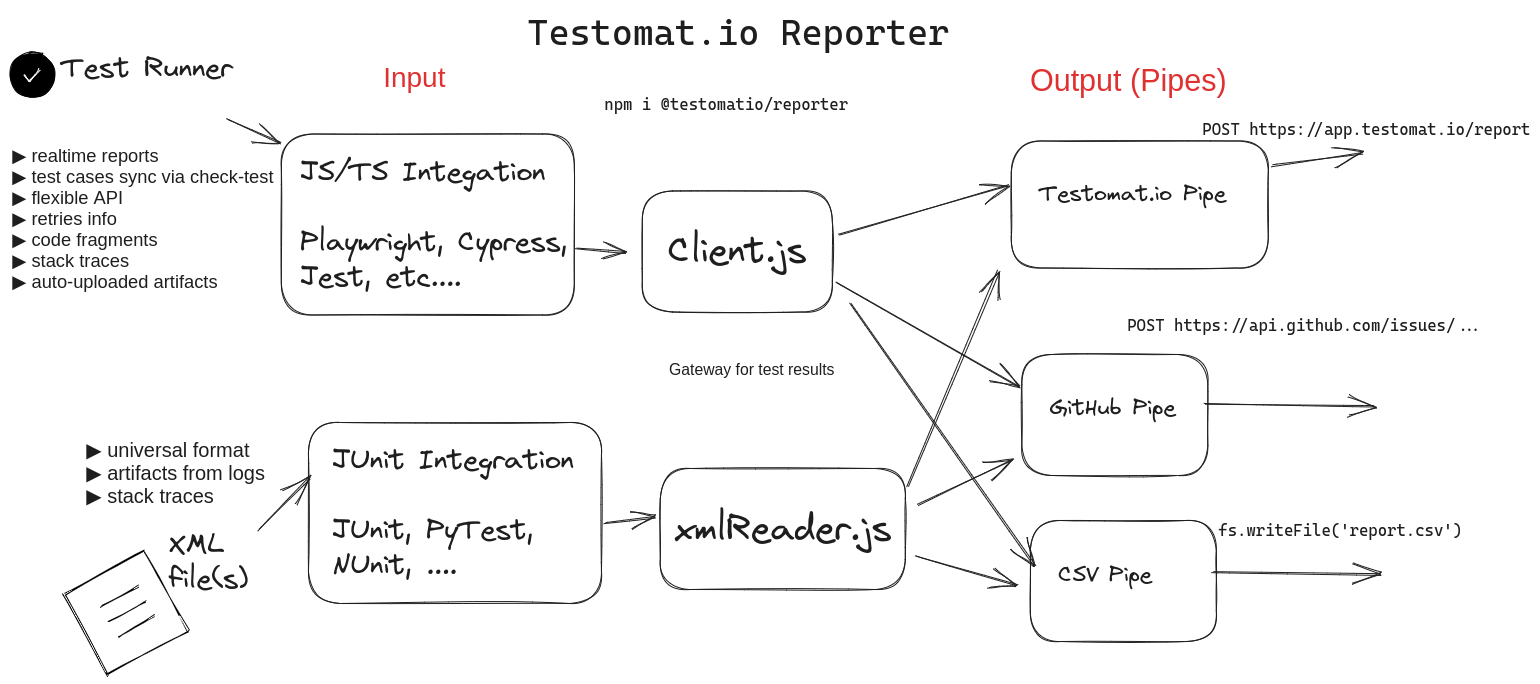
Artifacts like screenshots, videos, traces, are uploaded to your own cloud storage via S3 protocol. Artifacts can be uplaoded privately or publicly, and used in reports.
Installation
Section titled “Installation”To enable Testomat.io Reporter install @testomatio/reporter package
Use one of your favorite package managers:
npm install @testomatio/reporter --save-devpnpm install @testomatio/reporter --save-devyarn add @testomatio/reporter --devGetting Started
Section titled “Getting Started”1️⃣ Attach Reporter to the Test Runner
Section titled “1️⃣ Attach Reporter to the Test Runner”| Playwright | CodeceptJS | Cypress |
| Jest | Mocha | WebDriverIO |
| TestCafe | Detox | Codeception |
| Newman (Postman) | JUnit | NUnit |
| PyTest | PHPUnit | Protractor |
or any other via JUnit report…
2️⃣ Configure Reports
Section titled “2️⃣ Configure Reports”- Create report on Testomat.io.
- Create brief summary report for GitHub Pull Request 👇
- Create brief summary report for GitLab Merge Request.
- Configure other pipes for other ways to process test results output.
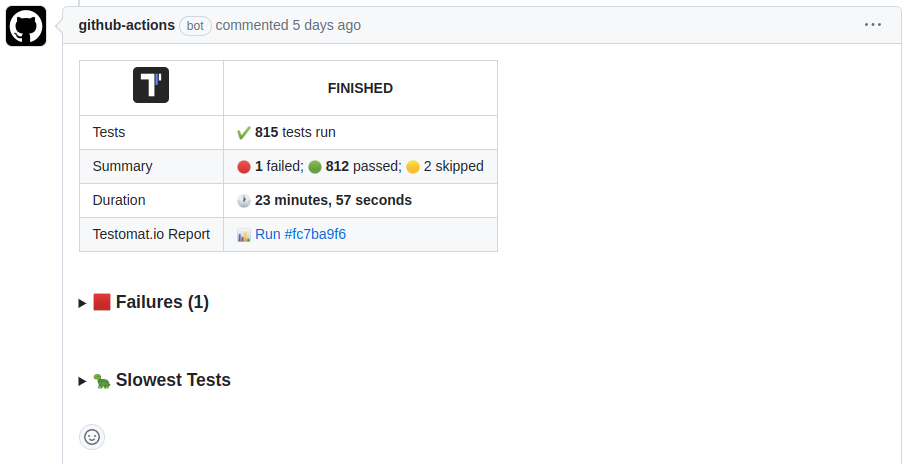
GitHub report published as a comment to Pull Request:
3️⃣ Enable Artifacts Storage
Section titled “3️⃣ Enable Artifacts Storage”- Create bucket on AWS, Google Cloud, or any other cloud storage provider supporting S3 protocol.
- Pass S3 credentials to reporter to enable artifacts uploading.
4️⃣ Use Logger
Section titled “4️⃣ Use Logger”Intercept your logger messages or log anything with our Logger (work in progress).
5️⃣ TESTOMATIO HTML Report
Section titled “5️⃣ TESTOMATIO HTML Report”Testomatio now features a custom reporting tool that allows you to generate a standalone HTML/CSS report for easy visualization of your test runs. This mode provides a quick way to gain a clear and visually appealing overview of your test execution.
With our reporter, you can:
- Easily analyze the results of your test runs in a convenient HTML format.
- Visualize data on successful and failed tests, including statistics and error details.
- Quickly share reports with your team members or stakeholders.
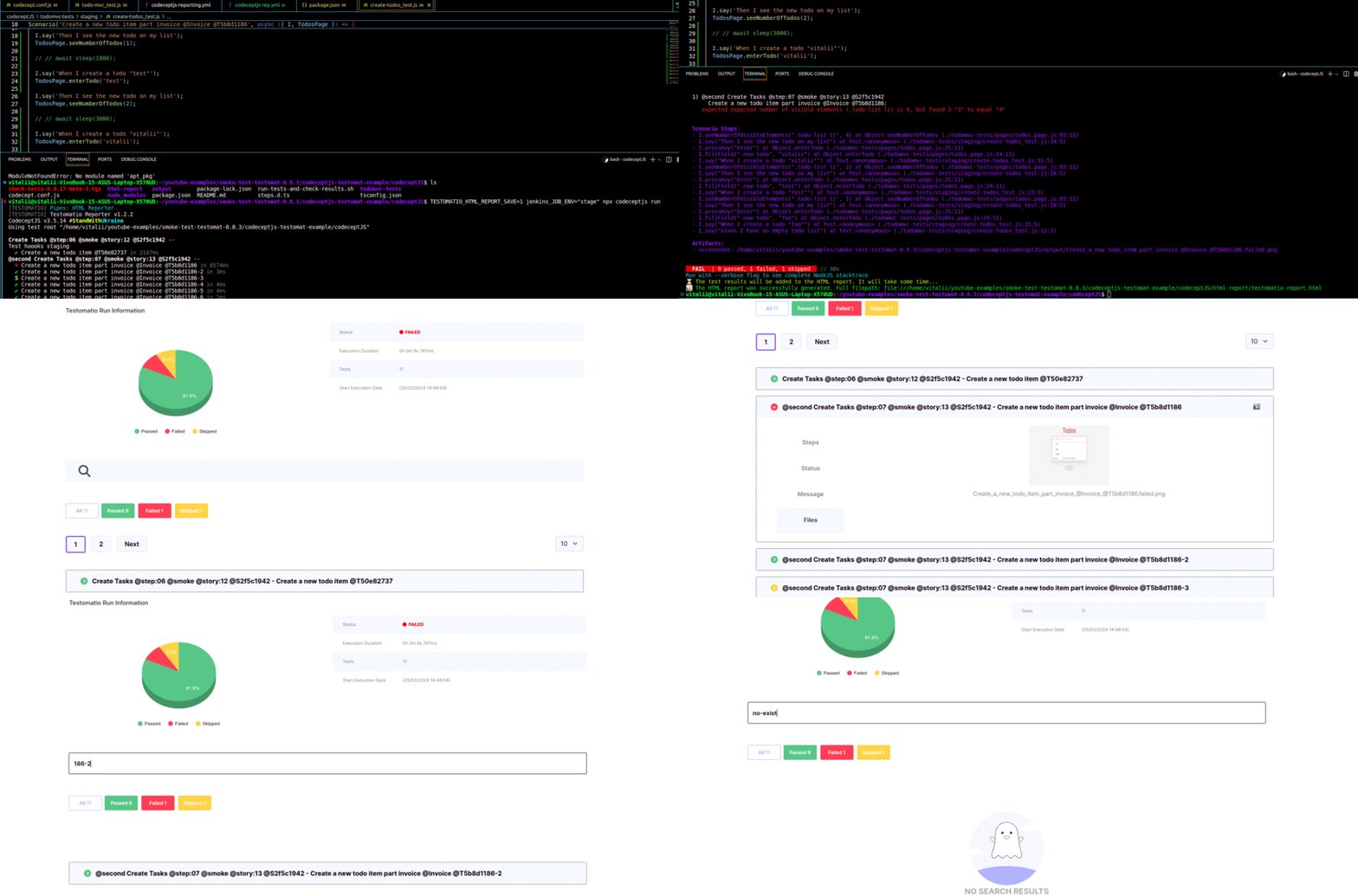
Learn more about generating HTML reports here
6️⃣ Add to CI Pipeline
Section titled “6️⃣ Add to CI Pipeline”After you tested reporter locally add it to your CI pipeline.
We prepared some example workflows that might help you to get it running.
🎉 You are all set!
Bring this reporter on CI and never lose test results again!
Documentation
Section titled “Documentation”- 🛠️ Frameworks
- ⛲ Pipes
- 🔗 Linking Tests
- 📓 JUnit
- 🗄️ Artifacts
- 🔂 Workflows
- 🖊️ Logger
- 🪲 Debug File Format
Development
Section titled “Development”REST API
Section titled “REST API”Testomat.io App uses REST API to collect data from the reporter.
Debug Logs
Section titled “Debug Logs”To enable verbose logging run tests with DEBUG environment variable:
To print all reporter logs:
DEBUG=@testomatio/reporter:*To print all reporter logs of a specific pipe:
DEBUG=@testomatio/reporter:pipe:github